

It’s late on a Tuesday night, and as you stare at your screen, the QuickBooks bank balance doesn’t even come close to matching your actual statement. You know the March 15 tax deadline for your S Corp is approaching. Yet, your Profit and Loss statement feels like a work of fiction. It’s a heavy burden to carry. You want to fix messy QuickBooks records, but the fear of accidentally deleting historical data keeps you stuck in a cycle of indecision. You aren’t alone in this frustration.
We understand that you’d rather focus on your passion than on transaction categorization. It’s time to replace that financial anxiety with a sense of calm control. This guide provides a clear, step-by-step path to untangle your accounts and regain visibility. We’ll walk through identifying common technical errors, reconciling your balances, and preparing a clean set of books. You’ll gain the confidence to hand your records to a tax professional without a second thought.
Key Takeaways
- Identify red flags like massive uncategorized buckets and uncleared transactions that create a disconnect between your bank statements and software.
- Master a methodical five-step recovery process to fix messy QuickBooks records and restore the integrity of your financial data.
- Break the cycle of errors by pausing new entries and performing deep reconciliations starting with your oldest historical records.
- Transition from reactive fixing to proactive monthly bookkeeping to ensure your records are always ready for tax season or loan applications.
Diagnosing the Chaos: Why Your QuickBooks Records Are Messy
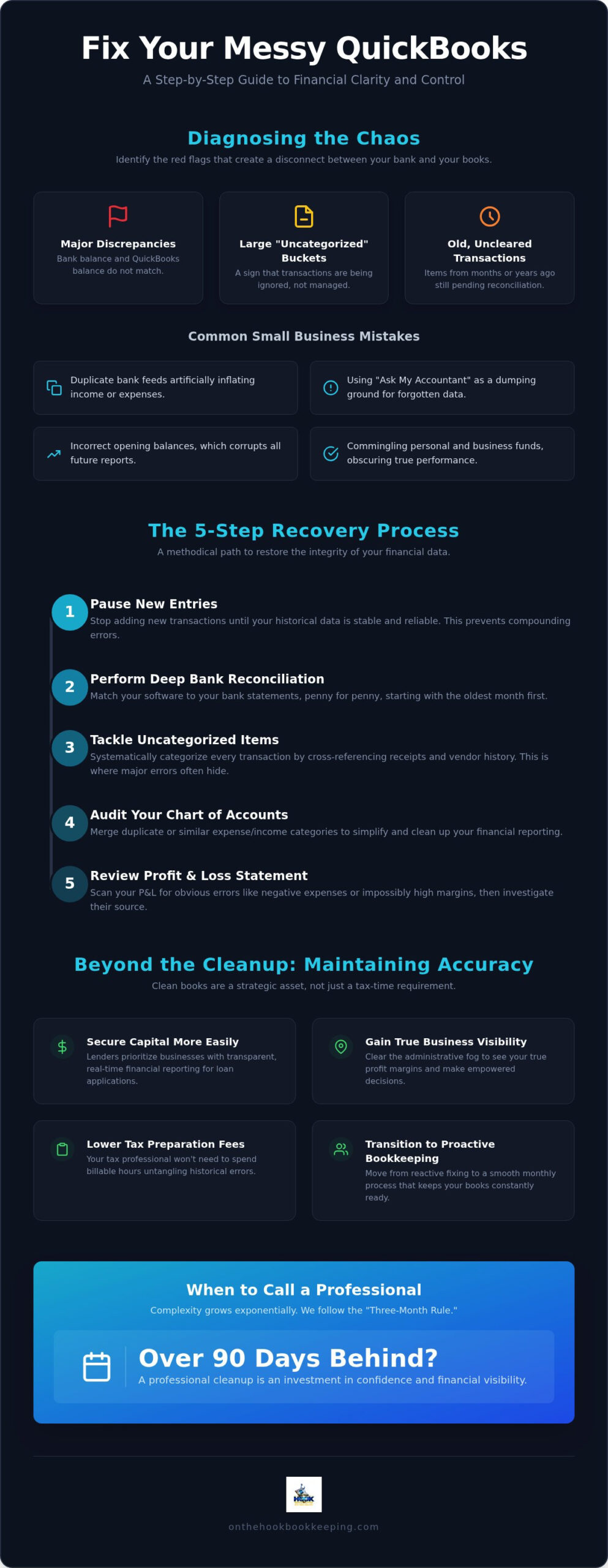
“Messy records” aren’t just a lack of organization. They represent a fundamental disconnect between your bank’s reality and your software’s data. When you decide to fix messy QuickBooks records, you’re essentially aligning these two worlds to regain visibility. QuickBooks is an incredibly powerful engine. However, even the best machinery requires a steady hand to stay on track. If you’re seeing uncleared transactions from two years ago, a massive “Uncategorized” bucket, or a balance that refuses to match your statement, those are your red flags. Ignoring these issues until tax season only compounds the weight. It turns a manageable project into a financial anchor that slows your growth.
The Most Common QuickBooks Mistakes for Small Businesses
Many entrepreneurs fall into the same recurring traps. Duplicate bank feeds are a frequent culprit. These often happen when you connect both a bank account and a credit card that transfer funds between each other, which artificially inflates your income or expenses. Then there’s the “Ask My Accountant” trap. It’s tempting to shove confusing transactions there, but without following standard methods of bookkeeping, that folder becomes a graveyard of forgotten data. Finally, incorrect opening balances act like a faulty foundation. If the starting point is wrong, every report that follows will be tilted. Commingling personal and business funds further muddies the water. It makes it nearly impossible to see your true business performance without a dedicated cleanup effort.
The 5-Step Process to Untangle Your QuickBooks Data
To fix messy QuickBooks records, you must first stop the bleeding. Don’t add new entries until your historical data is stable and reliable. Once the flow is paused, perform a deep bank reconciliation for every account, starting with the oldest month. Bank reconciliation is the process of ensuring your software matches your bank statement to the penny. Good records will help you stay compliant and prepared for any future audits or loan applications.
Next, tackle the “Uncategorized” transactions by cross-referencing vendor history and physical receipts. It’s often where the most significant errors hide. After that, audit your Chart of Accounts to merge duplicate categories. If you have three different accounts for “Office Supplies,” simplify them into one to make your reporting cleaner. Finally, review your Profit and Loss statement for obvious errors like negative expenses or impossibly high margins. If this process feels overwhelming, a professional cleanup and catch-up service can handle the heavy lifting so you can return to your primary passion.
Mastering Transaction Categorization for Better Visibility
QuickBooks rules are a double-edged sword. Use them to automate recurring expenses, but review them regularly to avoid a new mess of automated errors. Consistency is your best friend. Establish clear naming conventions for every vendor and customer to ensure your data stays uniform across every report. This discipline turns your software from a source of stress into a tool for growth and empowered decision-making.
Moving Beyond the Cleanup: Maintaining Accuracy for Growth
Once you fix messy QuickBooks records, the goal is to never return to that state of chaos. Transitioning from reactive fixing to proactive monthly bookkeeping transforms your financial data from a source of anxiety into a strategic asset. Clean records are essential for securing capital. Lenders in 2026 prioritize businesses with transparent, real-time reporting, which is why it’s critical to clean up business financials for loan approval well before you need funding. Additionally, organized books significantly lower your tax preparation fees. Your tax professional won’t need to spend billable hours untangling historical errors.
Think of catch up bookkeeping as a strategic reset for your entire company. It clears the administrative fog that often hides true business margins. As December approaches, following a structured year end bookkeeping cleanup checklist ensures your records are fully reconciled and ready for your tax professional before the deadline. While a QuickBooks bookkeeping cleanup guide provides a technical roadmap, the true relief comes from a partnership. Handing off the heavy lifting of administration to a professional allows you to regain your focus. It replaces confusion with empowered decision-making.
When to Call a Professional for QuickBooks Cleanup
Complexity doesn’t grow linearly; it grows exponentially. We follow the “Three-Month Rule.” If you are more than 90 days behind, the effort to fix messy QuickBooks records becomes a massive technical project. A professional cleanup is an investment in your confidence. It isn’t just a service fee. It’s the price of financial visibility. On the Hook Bookkeeping specializes in this mechanical untangling. We act as your advocate, cleaning the historical slate so you can lead your business with a steady hand and total clarity.
Reclaiming Your Financial Clarity
The journey to fix messy QuickBooks records begins with a single step toward organization. By identifying red flags like old uncleared transactions and following a methodical reconciliation process, you move from confusion to control. Clean books aren’t just for tax season; they’re the foundation for every strategic decision you make in 2026. You deserve the peace of mind that comes with accurate data and a clear Profit and Loss statement.
If the technical untangling feels like a burden, you don’t have to carry it alone. We offer specialized project-based cleanup fees and expert transaction categorization to restore your records. Once the chaos is cleared, you’ll receive detailed monthly financial reports to guide your growth. Get your time back with professional cleanup and catch-up support. You’ve built something incredible. Now, let’s make sure your financials reflect that same level of excellence.
Frequently Asked Questions
Can I just delete my QuickBooks file and start over if it is too messy?
It’s rarely advisable to delete your file because you lose the historical data required for long-term growth analysis and IRS compliance. Starting over creates a gap in your financial story that can be difficult to explain during an audit. Instead, it’s better to fix messy QuickBooks records through a systematic cleanup that preserves your history while correcting the errors.
How long does a typical QuickBooks cleanup take for a small business?
The timeline varies based on the volume of transactions and how many months of data need attention. A project covering six months of records might take one to two weeks, while years of backlog can take a month or more. We focus on a methodical approach to ensure every account is reconciled to the penny without rushing the process.
What documents do I need to have ready before I start fixing my records?
You should gather all original bank and credit card statements for the period you are cleaning up. Having loan agreements, payroll summaries, and large purchase receipts handy will also speed up the process. These documents act as the source of truth when we fix messy QuickBooks records, allowing us to verify that every digital entry matches your actual bank activity.
Will fixing my messy records change the amount of taxes I owe?
Improving the accuracy of your records often reveals missed deductions or duplicate income entries, which can directly impact your tax liability. While On the Hook Bookkeeping doesn’t file taxes, we provide the clean financial reports your tax professional needs. Accurate records ensure you aren’t overpaying and give you confidence that your margins are correctly reported to the IRS.